Collect reviews after a visit.
What This Page Is About
The Reviews page shows all customer reviews submitted for your business.
Here you can view, approve, decline, or delete reviews.
Only approved reviews appear on your public website.
You can also share your review link with customers so they can submit new reviews.
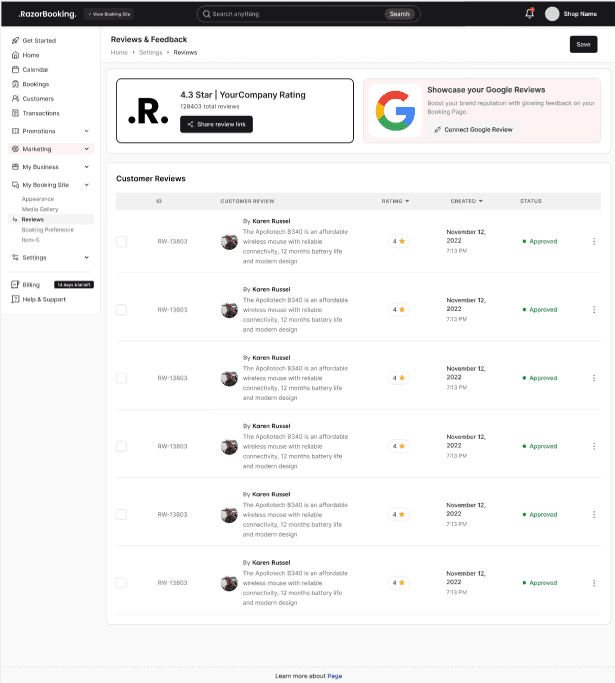
Share Review Link
At the top of the page, you will see a “Share Review” button.
Clicking it opens a modal
The modal shows your website review URL
You can copy the link and share it with customers
Customers can use this link to submit reviews
This makes it easy to collect more feedback.
Review Table
Below the share button, all submitted reviews are displayed in a table.
Each review contains:
✔ Customer Name
Name of the person who submitted the review.
✔ Description
Customer feedback text (if provided).
✔ Rating
Star rating given by the customer.
✔ Created Date & Time
When the review was submitted.
✔ Status
Every review has one of these statuses:
Pending – waiting for your approval
Approved – will be shown on the website
Declined – will not be shown on the website
✔ Actions
Each review has two action buttons:
Approve
Makes the review visible on your website homepage
Changes status to Approved
Delete
Permanently removes the review
Deleted reviews cannot be recovered
Reviews that are not approved will not appear on your website.
Tips & Best Practices
Approve only genuine and helpful reviews
Decline spam or irrelevant reviews
Keep your review section active to build trust
Share your review link after service completion to collect more ratings
Respond to reviews (if your platform offers reply option) to improve engagement
Common Questions
Q. Why is a review not showing on my website?
Because it is not approved yet. Only approved reviews are visible publicly.
Q. Can I edit a customer’s review?
No, reviews can only be approved, declined, or deleted.
Q. Can I restore a deleted review?
No, deletion is permanent.
Q. Where do customers get the review link?
You can share the link using the Share Review button.
Q. Can the status of a review be changed later?
Yes — you can approve or decline any time.
Q. Does the created date/time follow my business time zone?
Yes, the review timestamps follow your selected time zone.
Related Pages
Need Help
If you need assistance, contact support or use the in-app chat.