Set the booking rules customers agree to.
What This Page Is About
The Policies page allows you to upload or link important policies that will appear in the footer of your business website.
You can manage five types of policies:
Refund Policy
Cancellation Policy
Privacy Policy
Shipping Policy
Terms & Conditions
When a customer clicks any of these links in your website footer, they will be redirected to the PDF or URL you added.
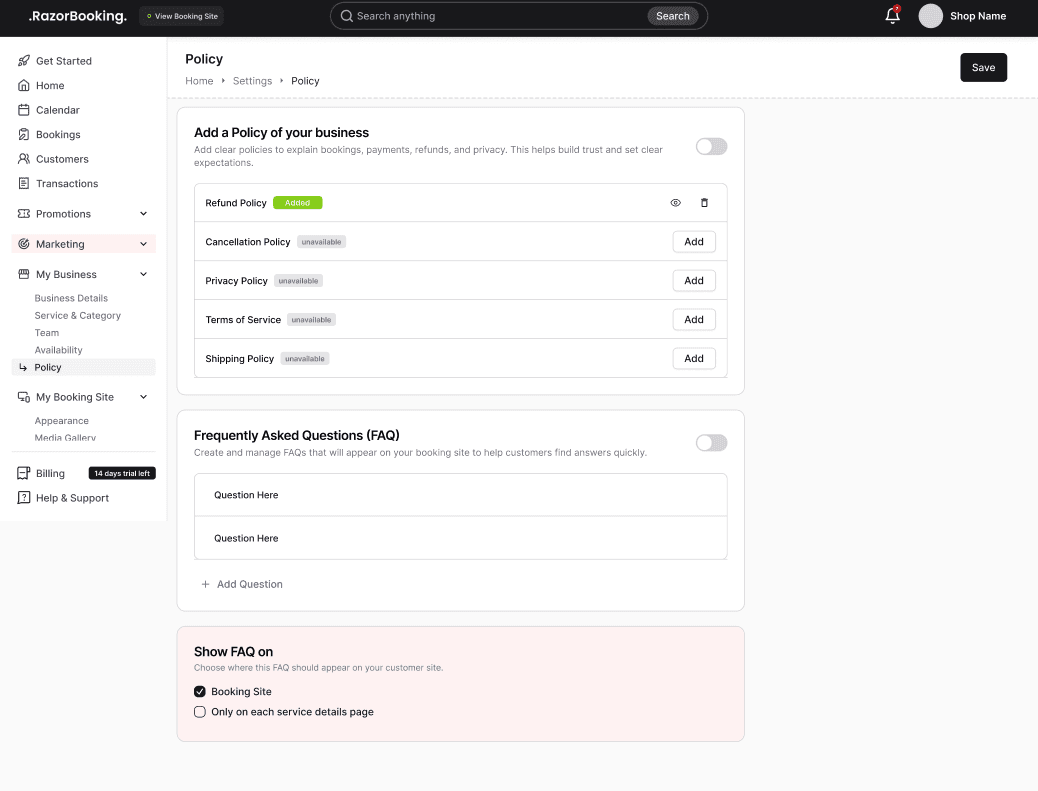
How Policies Work
Each policy has an Add button on the right side
Clicking the Add button opens a modal
Inside the modal, you can either:
Upload a PDF file, or
Paste a URL to your policy page
Only one policy file or link can exist per policy type
After saving, the policy link becomes active on your website footer
Viewing and Deleting Policies
View Policy
After adding a policy, an eye icon appears
Clicking this icon opens the policy so you can preview it
Delete Policy
Next to the view icon, there is a three-dot menu
Clicking it shows the Delete option
If you delete the policy:
The footer link will no longer work
You must upload the policy again to reactivate it
Updating a Policy
Policies cannot be edited
To update, you must:
Delete the current policy
Add a new file or URL
Tips & Best Practices
Always upload clear, updated policy files so customers trust your business
Use PDF for a professional policy format
If linking a URL, ensure the link is correct and publicly accessible
Keep all five policies filled for a complete and trustworthy website
Update your policies whenever your business rules change
Delete old policies before uploading new versions
Common Questions (FAQ)
Q. Where will these policies appear?
All policies appear as clickable links in the footer of your website.
Q. Can I add both a PDF and a URL for one policy?
No. Only one option can be added at a time (PDF or URL).
Q. Can I edit an existing policy?
No. You must delete it and upload a new one.
Q. What happens if I delete a policy?
The link will disappear from your website until you add a new policy.
Q. Are policies required?
Not mandatory, but highly recommended for professionalism and customer trust.
Q. Who can add or delete policies?
Only users with required permissions (Owner/Admin/Manager).
Related Pages
Need Help
If you need assistance, contact support or use the in-app chat.