RazorBooking vs Acuity Scheduling: An Honest Comparison for Service Businesses (2026)
Acuity Scheduling is a decent tool built for a different era. It charges you more for less, locks basic features behind expensive upgrades, and hasn't been built with your barbershop, salon, Automotive shops or service business in mind. RazorBooking is. Here's the proof.
What You'll Learn in This Comparison
What Is Acuity Scheduling — And Who Actually Built It For? The uncomfortable truth about who Acuity is (and isn't) designed for
What Real Users Say About Acuity Scheduling — Straight from G2, Trustpilot, and Capterra, unfiltered
Acuity Scheduling Pricing: The Real Cost Nobody Talks About — Why the sticker price is just the beginning
RazorBooking vs Acuity: Feature-by-Feature Breakdown — Where RazorBooking wins, and why it isn't even close
Why Service Businesses Are Leaving Acuity for RazorBooking — The switch that pays for itself
Final Verdict — Which one you should actually use
What Is Acuity Scheduling — And Who Actually Built It For?
Acuity Scheduling was founded in 2006. It was acquired by Squarespace in 2019 for $100 million and has since been embedded into the Squarespace ecosystem. Today, when you sign up for Acuity, you're signing up for a product maintained by a website builder company — not a team laser-focused on solving the real problems of service businesses.
That acquisition matters more than most people realise.
Since Squarespace took over, users began noticing something alarming. Here's what one verified user wrote on TrustPilot:
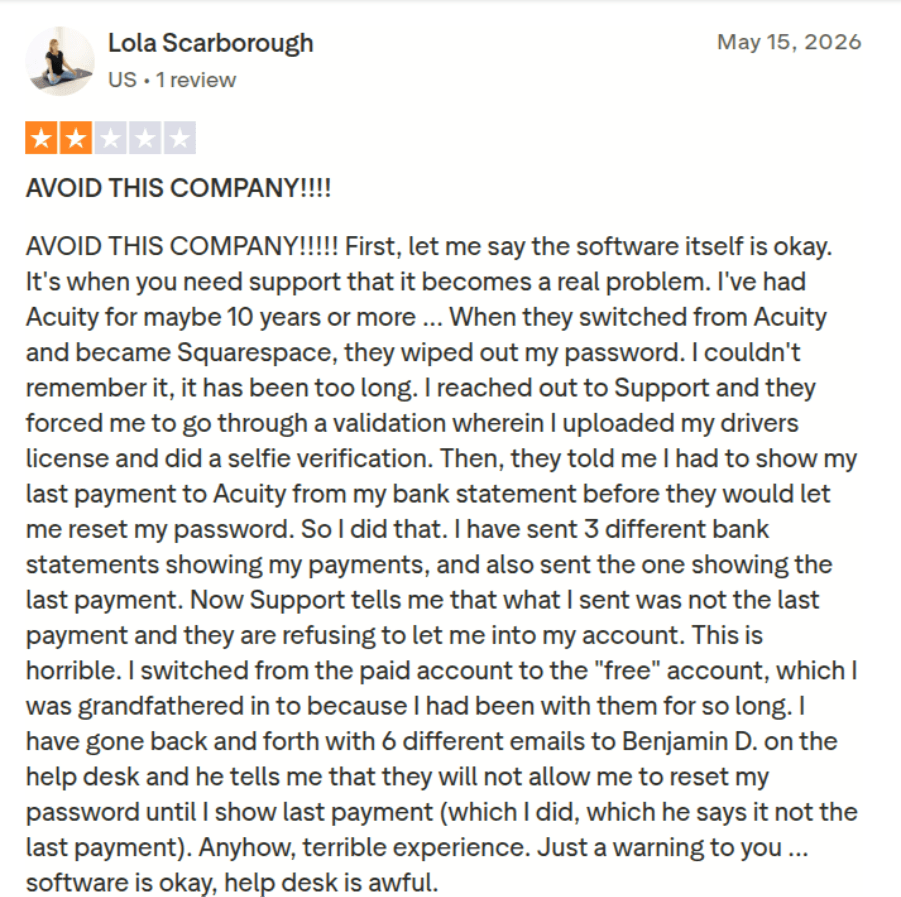
This is not a minor bug. This is what happens when a scheduling tool becomes an afterthought inside a larger company's roadmap. The people building Acuity today are building it in the context of Squarespace website plans — not in the context of a busy salon owner who needs to check their bookings between clients.
RazorBooking has one focus: helping service businesses take bookings, collect payments, and manage their team. Nothing else. No distraction. No acquisition agenda. No re-login loops every thirty minutes.
What Real Users Are Saying About Acuity Scheduling
Don't take our word for it. Here's what business owners — the exact audience Acuity claims to serve — have been saying across G2, Trustpilot, and Capterra.
"Not Intuitive. Techy Interface. Support Not Great."
One of the most damning reviews on Capterra, a Health and Wellness business owner who used Acuity for over 2 years and rated it just 2 stars:
"Not intuitive, Techy Interface, Support Not Great." — Dove, Health & Wellness Owner, 2+ years, Capterra
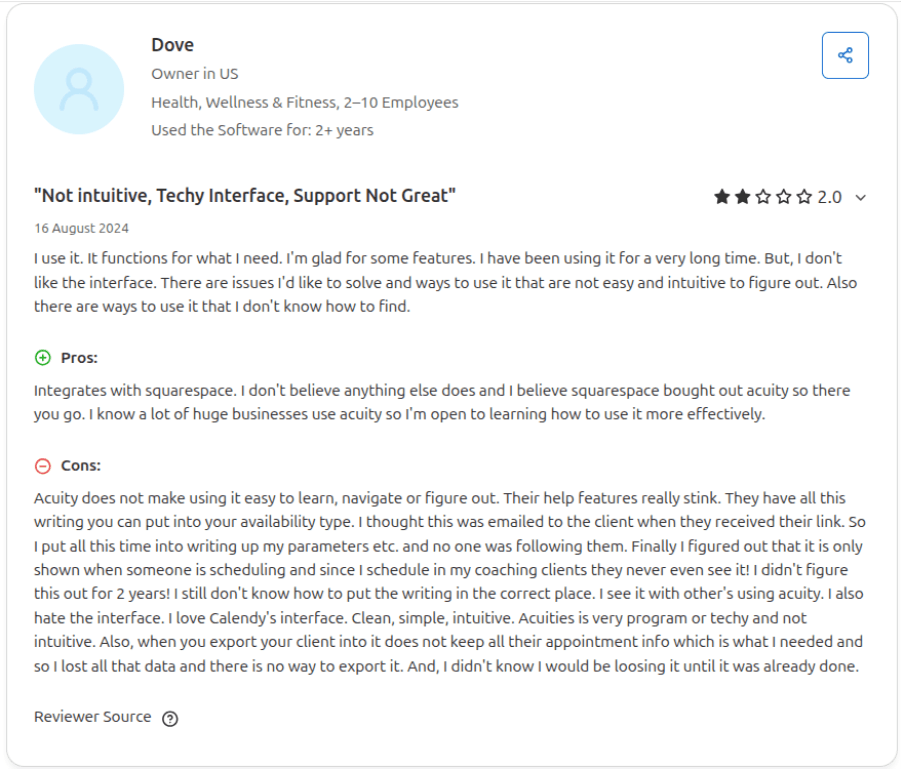
Two years of paying for software that isn't intuitive. Two years of a techy interface that a salon owner shouldn't have to wrestle with. Two years of poor support. That's what Acuity asks of you.
"The Menu Structure Is Overly Complicated"
From Trustpilot, a verified business user laid it out plainly:
"The system's menu structure is overly complicated and unintuitive, making it difficult to navigate efficiently. There is no clear logic behind the layout, so users constantly need to search for functions and settings, which significantly slows down daily operations." — Trustpilot verified review
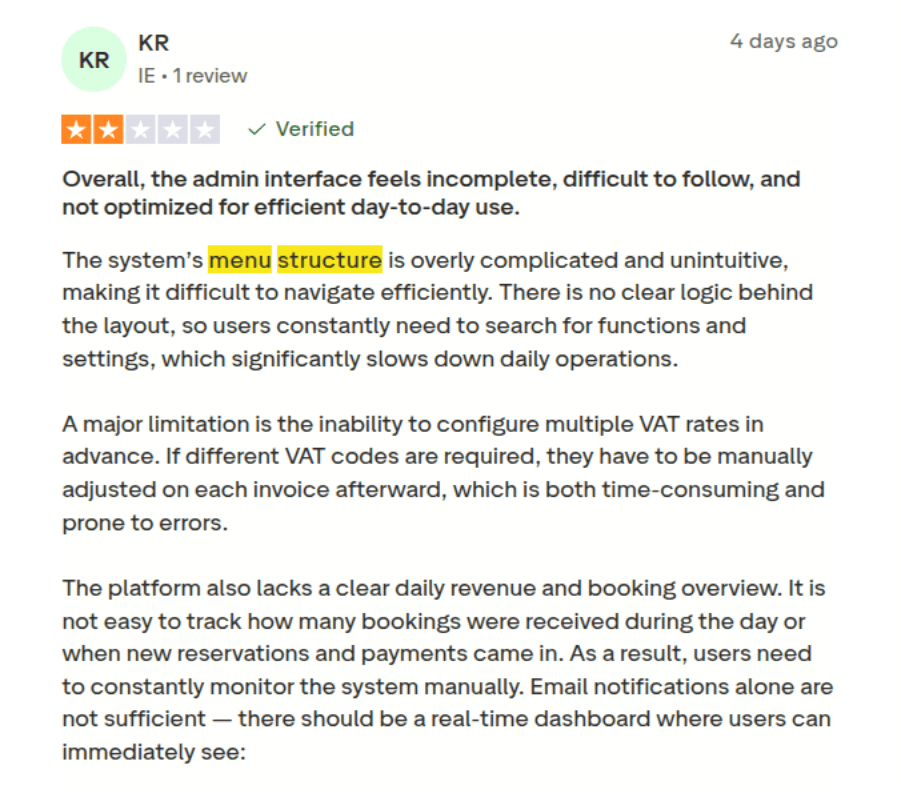
When a service business owner has to search for settings every time they want to change something, that's not software — that's homework. RazorBooking puts everything in one dashboard. Bookings, team schedule, payments, and client records — one screen. No hunting.
"Many Functions Are Not Intuitive or Flexible"
A second Trustpilot reviewer, clearly frustrated after months of wrestling with the platform:
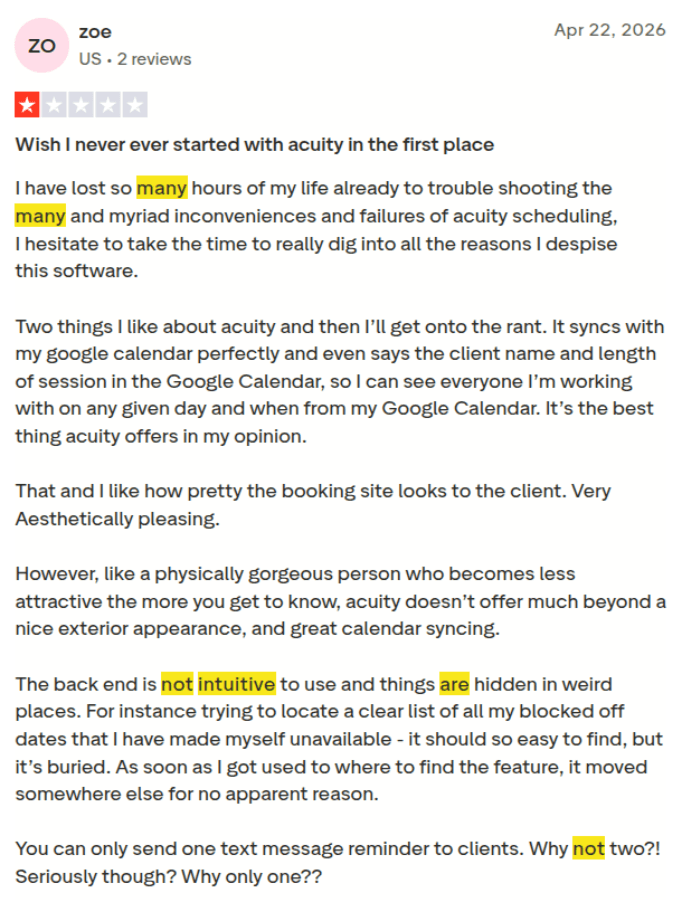
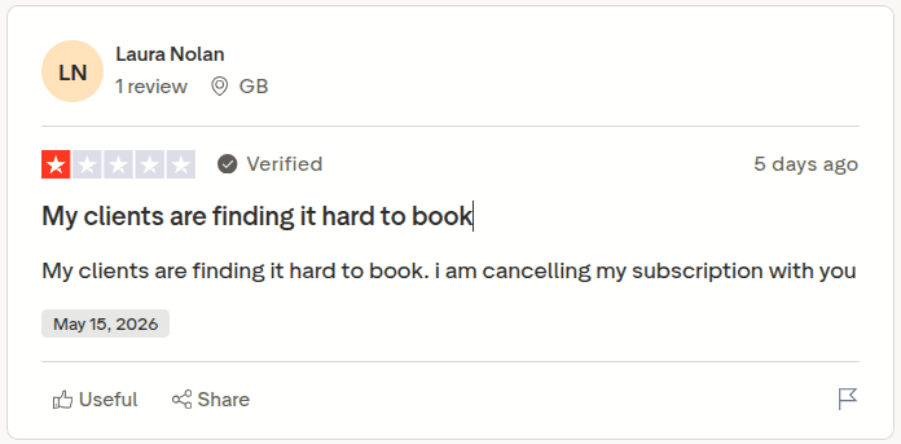
"Clients are finding it hard to book"
Think about what happens when your client finds it hard to book. They don't call you to complain. They don't email asking for help. They simply close the tab and book someone else. Someone whose booking page took three taps and thirty seconds. That lost client never shows up in your analytics. You never know they existed. But they are gone.
This is the most expensive problem a booking platform can create — and Acuity creates it regularly, pointing by user in one of their reviews on Trust Pilot
Acuity Scheduling Pricing: The Real Cost Nobody Talks About
Plan | Monthly | Annual | What's Actually Included |
Emerging / Starter | $20/month | $16/month | Basic scheduling, 1 calendar, email reminders only. No SMS. No packages. No memberships. |
Growing / Standard | $34/month | $27/month | SMS reminders, packages, memberships, up to 6 staff calendars |
Powerhouse / Premium | $61/month | $49/month | HIPAA compliance, custom reporting, up to 36 staff calendars |
The Dirty Truth Behind These Numbers
There is no free plan. Period.
Acuity offers a 7-day free trial — seven days — and then charges you. If you need to evaluate whether the platform actually fits your business, you have exactly one week to decide. Compare that to RazorBooking's 14-day free trial with full feature access.
The base plan is crippled by design.
Pay $20/month and you get no SMS reminders. For a service business trying to reduce no-shows, email-only reminders are not enough — your clients check WhatsApp and SMS, not their inbox. Acuity knows this. That's why SMS reminders are locked behind the $34/month plan. It's not a feature decision. It's a revenue decision — made at your expense.
The "free tier" that some sources mention is absolutely non-existent on Acuity. There's no free plan. There hasn't been one since before the Squarespace acquisition. If you've seen it mentioned anywhere, it's outdated information. You pay from day one, whether or not the platform works for your business.
What SMS reminders actually cost you:
You need SMS reminders. You know you need them because phone-checking clients miss email reminders constantly. So you upgrade from Emerging to Growing. That's an extra $14/month on the annual plan — or $168/year — just to get text messages your clients actually see. That's $168 Acuity charges you for a feature that should be standard.
RazorBooking vs Acuity: Feature-by-Feature Breakdown
1. Booking Experience for Clients
Acuity: Clients land on a scheduling page, choose an appointment type, and pick a time. It works. But it's generic, and experienced users consistently note the client-facing experience feels dated.
RazorBooking: Clients land on a fully branded booking page — your logo, your colors, your gallery. They browse your services, pick their preferred team member, choose a time, and pay — all in one clean flow. Multiple clients have described it as easier to use than any booking system they've encountered before.
"Our clients love that they can book a slot at midnight and get a confirmation instantly. No calls, no waiting." — Sima Dutta, Salon Owner, Glamour Villa
Winner: RazorBooking.
2. WhatsApp Reminders
Acuity: Does not support WhatsApp reminders. SMS only — and only on the $27/month+ plans.
RazorBooking: Sends booking confirmations and reminders directly to your clients' WhatsApp — where they actually spend their time. No app download required for the client. They see it instantly. You also get notified on WhatsApp the moment a new booking is made.
For beauty and personal care businesses in India, Southeast Asia, the Middle East, and Latin America — where WhatsApp is the primary communication channel — Acuity's SMS-only approach is a fundamental product failure.
Winner: RazorBooking — Acuity doesn't even play in this category.
3. Deposits and No-Show Protection
Acuity: Supports deposits and prepayments. This is one of Acuity's stronger features and it works reasonably well.
RazorBooking: Supports full payment, partial deposit, or pay-later options — all configurable per service. You also set a cancellation window that automatically blocks late cancellations and deducts cancellation fees. No awkward conversations. No manual enforcement.
"Collecting fees before the appointment has reduced no-shows a lot." — Prabhat Kumar, Homeopathic Consultant, RazorBooking user
Winner: RazorBooking — more flexible payment options plus automatic cancellation enforcement.
4. Client Gallery
Acuity: No gallery feature. Clients cannot see your work before they book.
RazorBooking: Built-in gallery feature, directly on your booking page. Upload photos of your cuts, colour work, nail art, or any service — clients browse before they book. Businesses using the gallery see up to 45% more bookings because clients can see the quality before committing.
A salon or barbershop that can't show their work before a client books is operating at a major disadvantage. Acuity simply doesn't solve this. RazorBooking built it in from day one.
Winner: RazorBooking — Acuity has no equivalent.
5. No Website Required
Acuity: Designed to embed into your existing Squarespace or other website. It is a scheduling widget, not a standalone business presence.
RazorBooking: Your RazorBooking page is your website. Services, gallery, team profiles, booking flow, and payments — all in one branded page you share anywhere. Share it on WhatsApp, Instagram bio, Google Business profile, or print it as a QR code for walk-ins.
"We tried another tool before this and gave up halfway through setup. RazorBooking was live the same day. The booking page looks clean and professional — clients actually use it." — Style Inc, Beauty Business, RazorBooking user
Winner: RazorBooking — Acuity requires a website. RazorBooking replaces the need for one.
6. Setup Speed
Acuity: Multiple users report the platform requires a learning curve. The menu structure is complex enough that some users have contacted support multiple times just for basic tasks.
RazorBooking: Three steps. Add your business details. Add your services and team. Share your link. Multiple users went live the same day they signed up.
"RazorBooking was live the same day. The booking page looks clean and professional." — Style Inc, Beauty Business
Winner: RazorBooking — dramatically faster to launch.
7. Team Management
Acuity Emerging plan: 1 calendar. One. If you have a team, you're already on the wrong plan. Acuity Growing plan: Up to 6 staff calendars at $34/month.
RazorBooking Solo: Up to 10 team members at $25/month. Each team member gets their own calendar. Clients can select their preferred staff member at booking. You see everyone's schedule from one dashboard.
Winner: RazorBooking — more team members, lower price.
8. Payment Flexibility
Acuity: Full payment or deposit. Payments via Stripe. Works well for basic needs.
RazorBooking: Full payment, partial deposit (e.g., 30% now, rest at appointment), or pay-later. Accepts Stripe, PayPal, Razorpay (UPI for Indian users), QR code, and cash. Every payment method managed from one dashboard. No external tools needed.
Winner: RazorBooking — more payment options, better suited for diverse service business contexts.
Why Service Businesses Are Leaving Acuity for RazorBooking
The pattern is clear. Service business owners — salon owners, barbers, spa operators, clinic managers — choose Acuity because it's well-known and appears well-reviewed. Then reality sets in.
The menu is harder to navigate than expected. Basic features like SMS reminders are locked behind a more expensive plan. The mobile app logs them out mid-day. Adding a team member costs more than they budgeted. The booking page looks like every other Acuity booking page because customisation is limited. And there's no WhatsApp. No gallery. No reason for a client browsing their options to choose their page over a competitor who shows off their work.
RazorBooking solves every one of these problems. Not as an afterthought. Not as an expensive add-on. As the core product, from day one, on every plan.
"Managing batch timings, one-on-one sessions, and walk-ins all at once was getting overwhelming. Now clients book their preferred slot and pay in advance — so I know exactly how many people are coming. No more guessing." — Serenity Yoga Studio, RazorBooking user
Final Verdict: RazorBooking vs Acuity Scheduling
The $4/month difference between RazorBooking's Solo annual plan and Acuity's Emerging plan is not a saving. On Acuity Emerging, you get 1 calendar, email-only reminders, no SMS, no WhatsApp, no gallery, no standalone booking presence, and a menu structure that multiple paying customers have publicly called confusing.
On RazorBooking Solo, you get 10 team members, WhatsApp and email reminders, a fully branded booking page that replaces your website, a client gallery, a clean one-dashboard experience, and a 14-day trial to test every feature before spending a single dollar.
The choice is clear. Acuity built a product for an era when having an online booking form at all was enough. That era is over. Service businesses in 2026 need WhatsApp reminders, branded booking experiences, payment flexibility, and software that works as hard as they do.
That's RazorBooking.
Start your 14-day free trial on RazorBooking → No credit card required. Live the same day.
Frequently Asked Questions
Is RazorBooking better than Acuity Scheduling for salons? For salons and personal care businesses, yes — RazorBooking is the stronger choice. It offers WhatsApp reminders (which Acuity doesn't support at all), a built-in client gallery, a branded booking page that replaces your website, and team management for up to 10 staff members on the base plan. Acuity is better suited for solo practitioners who need basic scheduling without a service-focused feature set.
Does Acuity Scheduling have a free plan? No. Acuity Scheduling has no free plan in 2026. They offer a 7-day free trial. After that, you pay from $16/month (annual) or $20/month (monthly). The base plan does not include SMS reminders, packages, or memberships.
Does RazorBooking send WhatsApp reminders? Yes. RazorBooking sends booking confirmations and appointment reminders directly to clients' WhatsApp — automatically, without any manual action from you. Reminder timing is fully customizable. Acuity Scheduling does not offer WhatsApp reminders.
Is Acuity Scheduling hard to use? Multiple verified reviews on Trustpilot and Capterra describe Acuity's menu structure as "overly complicated and unintuitive." Several users report needing to contact customer support multiple times for basic tasks. RazorBooking is designed for business owners who are not technical — most go live on the same day they sign up.
How does RazorBooking pricing compare to Acuity? RazorBooking starts at $20/month (annual billing) for up to 10 team members with WhatsApp reminders. Acuity starts at $16/month (annual) for 1 calendar with email-only reminders — no SMS until you upgrade to $27/month. For any service business with a team, RazorBooking delivers significantly more value per dollar.
Can I switch from Acuity to RazorBooking? Yes — and many service businesses are doing exactly that. Start your 14-day free trial on RazorBooking, set up your booking page (it takes minutes), and see the difference before cancelling Acuity. No technical migration required.